Firefox's "funny" css3 image scaling quirk

Hi 👋 you're reading a pretty old post! I started writing on here back in high school and this page may not reflect my current views. Recommend checking out related articles and categories down below, I've likely published more recent thoughts on this topic.
Last night as I was rewriting the CSS for postme.me from scratch and I was cursing and shouting obscenities under my breath and trying to find a way to punch all of Mozilla in the face over the internet ... I discovered something silly.

Scaling images is something every developer on the web has had to come to grips with. Maybe you were implementing an image gallery and wanted to display thumbnails, maybe you've reimplemented all the scaling algorithms several times.
It's surprising how complex something as simple as making sure no dimension is beyond a certain size while maintaining aspect ratio can be. Which is exactly why I wanted to avoid the whole thing this time 'round and let the browser take care of it all.
Should be pretty simple with CSS right?
Turns out it is, here's everything you have to do:
img {
  max-width: 300px;
  max-height: 200px;
}
Casting aside concerns such as load times and bandwidth for a moment. This is an elegant solution to a hairy problem. Browsers as it turns out do exactly the right thing - make sure neither dimension is too big and carefully adjusting the other dimension to maintain aspect ratio.
But try putting that image into a flexbox div and strange things start happening in firefox.
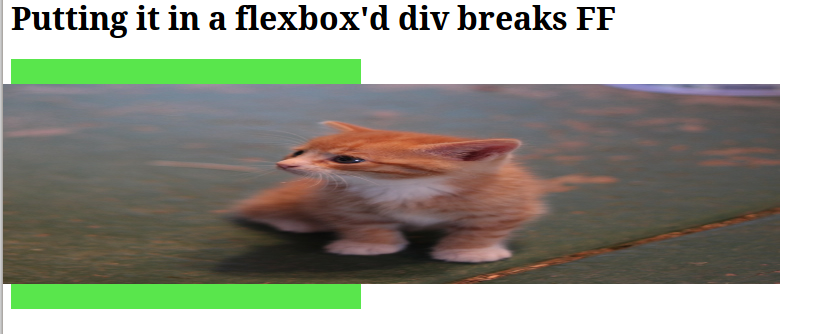
What's stranger still is that wrapping that same image into a vanilla div with zero styling not only fixes the image resizing issue, but also maintains centering and other flexbox properties you were originally going for.
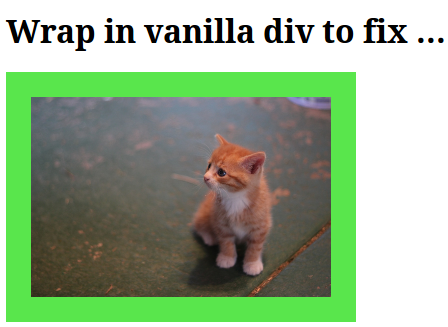
You can check it out in action here.
Not sure exactly what's going on here, but I'm glad I managed to find a fix for one strange thing among many. Now I have a website full of very very nonsemantic HTML simply because of javascript's quirks.
This brings up memories of times before I decided I don't care about IE support anymore ... granted, these features are far from standardized and it's therefore to be expected strangeness might appear. But Firefox is not where I expected such problems to crop up.
Filed under: CSSHTMLJavaScript