Using Backbone to improve multiselects

Hi 👋 you're reading a pretty old post! I started writing on here back in high school and this page may not reflect my current views. Recommend checking out related articles and categories down below, I've likely published more recent thoughts on this topic.
Sometimes you need to ask a users for multiple answers to a single question. But what's the best way to go about it?
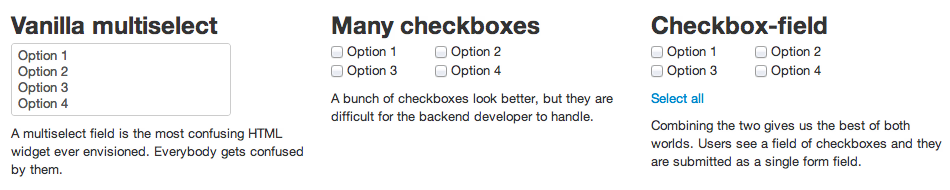
A multiselect input field is kind of strange for the user, sticks out and doesn't really behave like everything else on the web.
A bunch of checkboxes is better for the user ... but have you ever tried handling a form with dynamically created checkboxes? Let alone creating useful tests and consolidating everything into a single list of values. No decent forms framework will let you do that easily.
I had to solve this similar problem for a time and attendance software I worked on, so I made a Javascript thing to convert a select field into a checkbox-field. Then I made it into a simple jquery plugin thing for everyone to use :)
The idea is pretty simple:
- take a select, turn it into a list of options
- every option becomes a Checkbox model in a collection
- render each Checkbox as a CheckboxView
- connect everything with some events
What I really love about the Backbone approach is that all of this works almost magically. Instead of bending over backwards to get checkboxes and the hidden multiselect synced up, all I had to do was create some models, some views and tell them how they are connected.
This is how the field itself is created
$multiselect.find("option").each(function (i, el) {
  var $el = $(el);
  // hidden behind the scenes here is that:
  // 1. creating a Checkbox, correctly binds together all needed events
  // 2. adding it to checkboxes, takes care of rendering and adding to the DOM
  checkboxes.add(
    new Checkbox({
      value: $el.val(),
      label: $el.html(),
      selected: $el.attr("selected"),
    })
  );
});
And to make sure data is synced up between its three representations (multiselect, visual checkboxes, the data structure itself), all it takes is this:
var Checkbox = Backbone.Model.extend({
  initialize: function () {
    this.bind("change:selected", this.toggled);

    this.attributes.id = this.cid;
  },

  toggled: function () {
    var $opt = $multiselect.find("option[value=" + this.get("value") + "]");

    if (this.get("selected")) {
      $opt.attr("selected", "1");
    } else {
      $opt.removeAttr("selected");
    }
  },
});
Yep, that's the whole model and that's all it takes to sync everything up. Pretty cool huh? I remember trying to do this with just jQuery once ... I nearly stabbed my eyes out to end the misery.
All in all the whole thing is just 123 sloc, which can only mean one thing: Backbone is cool.
If you use my checkbox-field library, it's only going to be a single sloc for you:
$("#my_selector").checkboxField();That's it :)
Let me know what you think.
Filed under: HTMLJavaScriptjQueryLanguageProgrammingUX